
Use trusted sources
Work with local Swift source and attributed Apple guides.
The developer playground
Describe an iOS app in one sentence and the /ios-build agent plans it, writes the SwiftUI code, builds it and screenshots every screen in the Simulator. Plus Swift code reviews, local Apple references and Xcode Simulator tools for your coding agent.
Claude · ChatGPT / Codex · Gemini CLI · Muse
Drag an object. On touch, drag sideways. With a keyboard, use arrow keys; Escape resets.
Illustrative artwork, not a recorded app run.Meet iOS Agent Skill
iOS Agent Skill is an MIT-licensed repository and the ios-agent-mcp npm server for developers building or reviewing Apple apps with AI coding assistants.
Use it when an agent needs focused Apple references, file-located Swift review findings, an editable app starter, or a way to build, test and capture simulator screens. Your coding agent makes the changes; you keep your app’s source and branding.
Choose a client and follow its setup guide, or read the practical questions below.
Work with local Swift source and attributed Apple guides.

Give it focused context and the tools to make progress.

Build, test and inspect the result in your simulator.
One idea. A little further with every step.
From a brief to a build you can actually check.
Your agent does the work. These tools help it stay grounded.

01 / SHAPE IT
A reading list. A daily habit. Your next useful idea. Describe the screens, the behavior, and what “working” should mean.
The app starter gives your agent editable source and a brief. Relevant Apple guides and Swift examples help it plan the next move.
See the idea-to-app workflow
02 / BUILD IT
Let your coding agent implement one feature, review the relevant Swift, and run the checks. A failure is the next thing to understand.
Keep the diagnostic, explain the smallest fix, and verify again. Bounded retries keep a broken build from becoming an endless loop.
Explore the build-and-fix loop
03 / CHECK IT
Build and test with Xcode, then inspect the simulator. Compare the result with the acceptance criteria you started with.
This Reading List capture is from a real iOS 26.5 simulator acceptance run using synthetic book data. It demonstrates this screen—not a live AI session or an iOS 27 run.
Run the demo yourself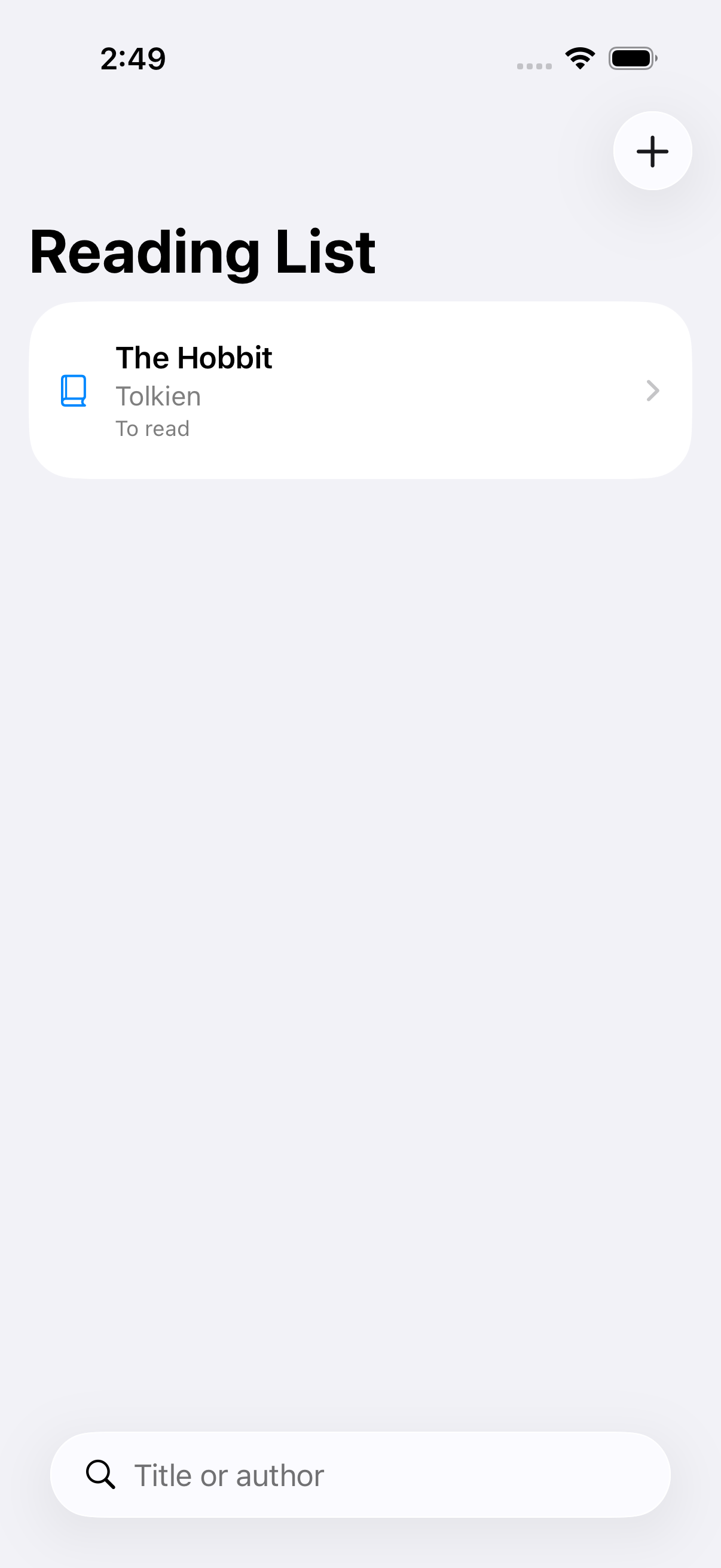
A little less guesswork
Keep your favorite AI. Give it a focused toolkit for the work of building an Apple app.
The ios-build agent plans screens, data and capabilities, writes SwiftUI and the Xcode project, then builds, runs and screenshots the app in the simulator. Available in ios-agent-mcp 2.10.0.
An editable Swift starter, implementation brief and optional XcodeGen specification.
Search local Swift source and guides in bounded sections, plus a dated directory of Apple technologies and release notes.
File-located findings for concurrency, architecture, SwiftUI, availability, security, performance and App Intents.
Named light/dark/high-contrast colors and an opaque 1024px app icon rendered locally from editable SVG layers.
Generate semantic palettes and inspect light, dark and high-contrast color evidence.
Identify supported services and review credential, auth, policy and networking evidence locally.
Build, test, install, launch and capture screenshots through Xcode.
Conservative target-aware checks for launch configuration, storyboards and asset references.
Inspect selected-target facts, unresolved questions and hashed, resumable local packages without connecting to Apple.
Turn captures into localized screenshot sets with reusable layouts, neutral frames, a preview gallery and validated PNG exports.
Preview and review Calendar, Reminders, Contacts, Photos, Camera, Maps, Files, Sharing, Shortcuts and Notifications with permission and capability evidence.
Your agent implements the app and verifies the result. Local simulator tools require a Mac with Xcode. These features are in ios-agent-mcp 2.9.0 on npm. The build agent is in 2.10.0, prepared and not yet on npm. What’s new →
One package. Your choice.
Choose your coding client. Connect the server. Start with one small, verifiable task.
Node.js 20+ for the local server.
No separate simulator package to install.

01 / CONNECT YOUR CLIENT
claude mcp add ios-agent -- npx -y ios-agent-mcp@latestRun from your app folder, then reconnect Claude Code.
Claude setup and usage guide02 / GIVE IT A SMALL FIRST TASK
“Review this app’s Swift concurrency. Show each finding with its file and line. Propose the smallest fix, then help me test it.”
Open source. Open about the limits.
Inspect the source, review the rules, and ask your agent for actual build and test results.
A quality or token-saving advantage has not been established. The verification notes tell you what’s tested and what still needs work.
Read the evidenceBefore you install
Concrete workflows, with the requirements and limits up front.
Connect ios-agent-mcp to your local coding client, open your app folder, and ask for a focused concurrency, SwiftUI, architecture or availability review. Findings include file locations so you can inspect a proposed change. These checks are heuristics; validate fixes with the Swift compiler and your tests.
Yes, with the /ios-build agent in Claude Code on a Mac with Xcode 16 or later. It writes a plan with costs and needed accounts, creates the project, writes the code, builds and fixes errors within a budget, and screenshots each screen. Four example apps it wrote built on the first try in Xcode 27.0. Its own build loop has not yet run end to end on a Mac, and every capability module is marked untested until it passes its own check.
The bundled tools can build, test, install, launch and capture screenshots using a local Mac with Xcode. Start with a configured Xcode project, an available simulator and a connected client. A screenshot confirms what was displayed, not every behavior.
There are setup guides for all four client families. Gemini’s extension and local connection are verified; Muse’s tool discovery and Stop hook are verified. Those checks do not establish a complete model-driven app-building session in every client.
ChatGPT web needs its own supported connection path. A local stdio MCP command is not a browser installation. The guide separates portable skills from a separately configured HTTPS or private-tunnel MCP connection, subject to your account and workspace policy.
The repository is MIT-licensed. The local server requires Node.js 20 or later; build, test and simulator tools additionally need macOS and Xcode. Your chosen AI service may have its own costs. XcodeGen is required when generating an Xcode project from the optional starter specification.
No. It supplies reusable guidance and tools alongside your coding agent and Xcode. Static reviews can miss issues or produce false positives. Token savings and an advantage over other workflows have not been established. Source references, tests and recorded checks let you evaluate it yourself.
For release changes, read the published releases and changelog. Source-only features are not automatically available in the npm release.
Built in the open
See the mentions, discussions and people helping this project get better.