Bring files together
Merge PDFs, split documents, rearrange pages and keep everything in the right order.
YOUR PDF WORKSPACE FOR IPHONE
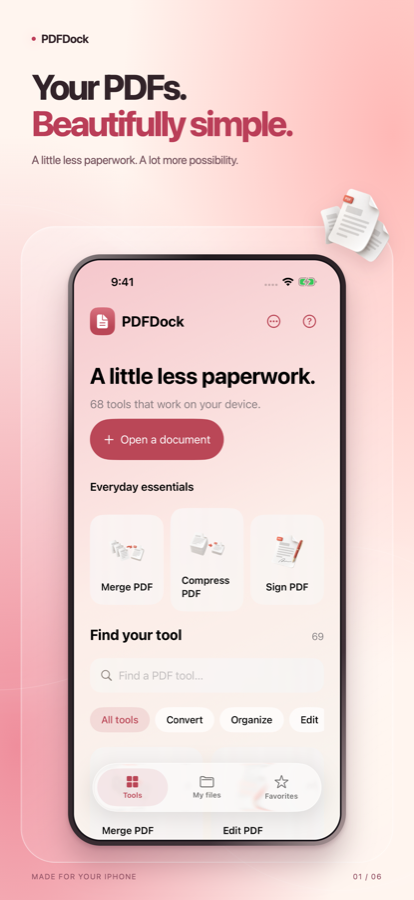
Make room for your next idea. Bring documents together, add your signature, and keep your finished PDFs close.
Free for iPhone · Coming to the App Store
Explore PDFDock
FROM FIRST PAGE TO FINISHED PDF
Merge PDFs, split documents, rearrange pages and keep everything in the right order.
Annotate pages, edit supported text and import compatible static TrueType fonts. Save a new copy while keeping the original.
Draw and save a handwritten signature on your device. Tap a page to place it, then move or resize it.
Scan paper documents with your iPhone camera or choose images from your photo library.
Compress documents and convert supported formats. Preview the result before sharing.
Find saved exports in My files and the Files app. Share a finished document whenever you are ready.
DESIGNED AROUND YOUR DOCUMENTS
Most tools process files locally. No conversion account is required. URL to PDF connects to the website you choose.
PDFDock does not collect your documents or use advertising or tracking SDKs.
Read our privacy policyConversion support varies by format. Office and ebook conversions focus on readable text and may omit original layout and images. Spreadsheet exports contain text rows rather than reconstructed tables.
Text editing works with compatible individual text runs and does not automatically reflow paragraphs. Saved handwritten signatures are visual marks, not certificate verified digital signatures.
Requires iOS 26.5 or later. Built for iPhone.
Find answers or report an issue through our support page.
Get support